Introduction
bee-check is a retrievability checker for Ethereum Swarm
references — the Swarm analog of check.ipfs.network.
You give it a 64-hex Swarm reference and one or more Bee API URLs;
it tells you whether the reference is retrievable through each Bee
node, how long retrieval took, which neighborhood each probe sits in
relative to the chunk, and — with --per-chunk — exactly which
chunks of the manifest are missing where.
It ships as two surfaces with identical capabilities:
bee-check— a Rust CLI, installable from crates.io, ideal for scripts, CI, and oncall workflows.bee-check-web— a static SPA atethswarm-tools.github.io/bee-check-web, ideal for ad-hoc diagnostics and sharing a reproducible link with a teammate.
Both speak the same spec_version: 1 JSON report shape, so a probe
run on the CLI can be dropped onto the web page to visualize it (or
vice versa).
Who is this for
- Application developers uploading to Swarm who want to confirm their content is actually reachable from outside their own node.
- Bee node operators investigating “user X says they can’t get ref Y from my gateway” reports.
- Researchers measuring retrievability under different network conditions or across different node fleets.
What this book covers
- Concepts — what “retrievable” actually means
in Swarm, how the stewardship probe differs from a
/bzzdownload, and what overlay / neighborhood / proximity-order numbers mean when they show up in a report. - CLI guide — install, every flag, output formats, the re-seed flow.
- Web UI guide — running the SPA against your own Bee, dealing with CORS and HTTPS mixed-content, walking through the results panel.
- Cookbook — worked scenarios: lost uploads, feed references, re-seeding from an old batch, multi-region probes.
- Reference — the JSON shape, exit
codes, and a feature-by-feature comparison to
check.ipfs.network.
Conventions used in this book
code spans are CLI flags, HTTP paths, or JSON keys.
Note boxes flag subtle behaviors or footguns.
bee-check-the-CLI is referred to as just bee-check; the SPA is
always bee-check-web to avoid ambiguity.
How to read it
If you’ve never used bee-check before, start with Quick
start and skim the first three Concepts pages —
that’s enough to read a report. If you’re triaging a specific
problem, jump to the Cookbook.
Quick start
This page gets you to a working probe in under a minute, twice — once from the CLI, once from the browser.
Prerequisites
You need access to at least one Bee node with an HTTP API you can reach. That can be:
- a node you run locally at
http://localhost:1633, or - a remote node whose
cors-allowed-originsis configured to allow the SPA’s origin (only matters for the web UI).
You also need a Swarm reference to check — a 64-hex (32-byte)
address. If you don’t have one handy, upload anything with swarm-cli
or curl -X POST .../bzz first.
CLI: install and probe
cargo install bee-check
bee-check <your-64-hex-ref> --bee http://localhost:1633
A successful run prints something like:
ref     c79394a6c311f816373ec9945365325e7fc0784cfa9a62deec1524d2c2bdc36a
status  Retrievable

vantages:
  http://localhost:1633  retrievable       312 ms  nb 71 PO 3
The nb 71 PO 3 tail means: the probed Bee’s overlay sits in
neighborhood 71, and the proximity-order between that overlay and
the reference is 3. See Overlay, neighborhood, proximity
order for what those numbers tell you.
Multi-vantage in one command:
bee-check <ref> \
  --bee http://localhost:1633 \
  --bee https://my-other-bee.example.com
Add --per-chunk to walk the manifest and probe every reachable
chunk on every vantage. Add --gateway https://api.gateway.ethswarm.org
to fold a public gateway HEAD probe into the same report.
Web: open the SPA
Visit ethswarm-tools.github.io/bee-check-web,
paste your reference, paste your Bee URL, click Check.
If you get a CORS error in the browser console, see Setup and CORS — your Bee node needs to allow the page’s origin.
If you point at http://... instead of https://... (and not
localhost), the browser will block the call as mixed-content. Same
chapter covers the fix.
What to read next
- Concepts overview — what the report fields actually mean.
- Cookbook — solving specific problems.
- Command reference — every flag.
Concepts
A retrievability probe is only as useful as the mental model behind the numbers it prints. The chapters in this section cover the essential ones:
- Swarm references vs IPFS CIDs — what the 64-hex address actually identifies, and why this isn’t a CID.
- The stewardship probe — what
GET /stewardship/{ref}does on the inside, and why it can disagree with a plain/bzzdownload. - Multi-vantage and “partial” — what each row in the report represents, and how the top-level status is aggregated.
- Overlay, neighborhood, proximity order — the
geometry of the Swarm address space and how
bee-checkannotates each vantage with its position relative to the chunk. - Manifests and per-chunk drill-down — why a “yes”
on stewardship sometimes hides per-chunk gaps, and what
--per-chunkexposes. - Postage batches and re-seeding — what a batch is, what makes one “usable”, and how re-seeding works under the hood.
If you only read three: Stewardship, Multi-vantage, and Proximity.
Swarm references vs IPFS CIDs
A Swarm reference is a 32-byte address (rendered as 64 hex chars, or 128 hex chars for the encrypted variant) that identifies content in the Swarm network. It looks like:
c79394a6c311f816373ec9945365325e7fc0784cfa9a62deec1524d2c2bdc36a
bee-check accepts that hex string with or without a 0x prefix.
How it differs from an IPFS CID
A reference is content-addressed like a CID, but the resemblance ends there:
| Swarm reference | IPFS CID | |
|---|---|---|
| Hash function | BMT-keccak256 (Binary Merkle Tree) | configurable; usually sha2-256 |
| Encoding | raw hex | multibase + multihash + codec |
| Self-describing | no — the bytes don’t tell you the hash function | yes — the multihash prefix does |
| Length | 32 bytes (64 hex), 64 bytes (128 hex) for encrypted | variable |
| Mutable equivalent | Swarm feed (feed:OWNER:TOPIC) | IPNS / DNSLink |
The practical consequence is that you can’t tell from the bytes alone
whether a reference points to a raw chunk, a manifest (file or
directory), or a feed update. bee-check will try to walk it as a
manifest when you pass --per-chunk; if that fails, it falls back to
treating it as a single chunk.
Mutable references — feeds
Swarm feeds are the analog of IPNS/DNSLink. A feed is identified by
an (owner, topic) pair:
owner— a 20-byte Ethereum address (40 hex chars)topic— a 32-byte hash (64 hex chars)
bee-check accepts feed inputs as feed:OWNER:TOPIC or
feed:OWNER/TOPIC and resolves them via GET /feeds/{owner}/{topic}
on the first --bee URL before probing. The resolved chunk reference
becomes the report’s top-level reference, and the original
(owner, topic) is preserved under resolution.
Note: Feed resolution only goes one level deep. If the feed points at another feed, you’d need to resolve that one separately. In practice this never comes up because feed payloads are normally manifest references, not other feeds.
See also
The stewardship probe
The core operation bee-check performs against every vantage is:
GET /stewardship/{reference}
This Bee endpoint walks the manifest at reference and tries to
fetch every chunk through the network — using the probed Bee node as
the requesting peer. It returns:
{ "isRetrievable": true | false }
isRetrievable: true means the probed node was able to reach every
chunk of the content through Swarm retrieval (i.e. through other
peers in the network, not just from its own local store).
Why “from this vantage” matters
The answer is not a global property of the reference. It’s the answer this specific Bee node got when it tried. Two nodes in different neighborhoods will commonly get different answers for the same reference, because:
- chunks are stored close (by proximity) to their address, and
- a node retrieving a chunk has to route a request that eventually reaches a peer in that chunk’s neighborhood.
A node in the chunk’s neighborhood gets a fast local-or-near answer. A node far from the chunk has to traverse more hops, which is more likely to time out or hit unresponsive peers.
This is why bee-check is built around multi-vantage probing:
each --bee URL is a different perspective on retrievability, and
the aggregate partial status is meaningful in
its own right.
Why stewardship can disagree with /bzz
The most common surprise:
curl http://localhost:1633/stewardship/<ref>   # {"isRetrievable":false}
curl http://localhost:1633/bzz/<ref>/          # 200 OK with content
Both can be true. /bzz/{ref}/ serves the content using whatever
path is fastest, which typically means the node’s local store if
the chunks are pinned there. /stewardship/{ref} deliberately
re-fetches through the network retrieval path to answer the
question “can a peer who doesn’t have this locally actually get it?”
So if you uploaded with swarm-deferred-upload: true (default) and
your node hasn’t yet pushed the chunks into the network, stewardship
will say no even though /bzz happily serves them. This is the
“my upload looks lost” case covered in the Cookbook.
What the timing tells you
bee-check records elapsed_ms for each vantage — wall-clock time
from issuing the request to receiving the answer. Combined with the
per-chunk drill-down you can often distinguish:
- Fast yes — chunk is local or in the immediate neighborhood.
- Slow yes — chunk had to traverse several hops; network is working but the probed node isn’t near the content.
- Slow no — request timed out walking the network; possibly a garbage-collected chunk or a dead neighborhood.
- Fast no — usually a hard error: 404 from the API, bad request, CORS rejection in the browser.
See also
- Bee API — Stewardship (
GET /stewardship/{ref},PUT /stewardship/{ref}) - Swarm docs — Retrieval protocol
Complement: the cold-download probe
bee-check --cold adds an orthogonal probe alongside stewardship:
it streams GET /bytes/{ref} from each Bee URL (and GET /bzz/{ref}/
from each gateway), counting total bytes and timing the full
transfer. Use it when stewardship and a manual /bzz request
disagree — the cold-download will tell you whether bytes actually
flow end-to-end, which catches HTTP-level problems (compression
issues, content-length mismatches, mid-stream errors) that the
chunk-graph walk doesn’t surface.
Multi-vantage and “partial”
Every --bee URL you pass becomes one row — a vantage — in the
report. A vantage probes the reference independently and contributes
one outcome: retrievable, unretrievable, or error (where
error means the call itself failed before we got an answer).
The report’s top-level status aggregates them:
| All vantages said | Top-level status | Exit code |
|---|---|---|
retrievable | retrievable | 0 |
unretrievable (or error) | unretrievable | 2 |
| mix of yes and no | partial | 0 (at least one yes) |
| every one errored | error | 2 |
Public gateway probes (--gateway) are folded into this same
aggregation — a “yes” from any gateway counts the same as a “yes”
from any Bee.
What partial actually means
partial is the most interesting outcome. It says: the reference
is retrievable from some perspectives in the network but not
others. This is often fine (Swarm is a distributed network; not
every node has visibility into every chunk’s neighborhood) but it
can also be a leading indicator of:
- Asymmetric pinning — only one node has the content pinned and the chunks haven’t propagated yet.
- A specific neighborhood being slow or unreachable — combine
with
--per-chunkto see which chunks are missing where. - Postage batch staleness — chunks whose batch is expiring can start to disappear from the neighborhood that was storing them.
Picking your vantages
The signal you get is only as good as the perspectives you sample. A useful baseline:
- one node you control (lets you see network-retrievability from your own infrastructure)
- one node in a different geographic region (catches “it works here but not from EU” cases)
- one public gateway (
--gateway https://api.gateway.ethswarm.org— proxies a retrieval through a gateway operator’s nodes)
For the public gateway probe, see also Comparison to check.ipfs.network — a “yes” from the gateway is the closest analog to “yes from the network” that you’ll get without operating fleets yourself.
See also
Overlay, neighborhood, proximity order
A Swarm node has an overlay address — a 32-byte identifier in the same address space as chunk references. This overlay determines where in the network the node sits, and therefore which chunks it’s responsible for storing and serving.
bee-check calls GET /addresses on every vantage and surfaces:
overlay— the node’s full 32-byte overlay (rendered as 64 hex chars).neighborhood— the first byte of the overlay, by convention the unit used when discussing where a chunk “lives”.proximity_to_root— how close the node sits to the reference being probed (defined below).
Proximity order (PO)
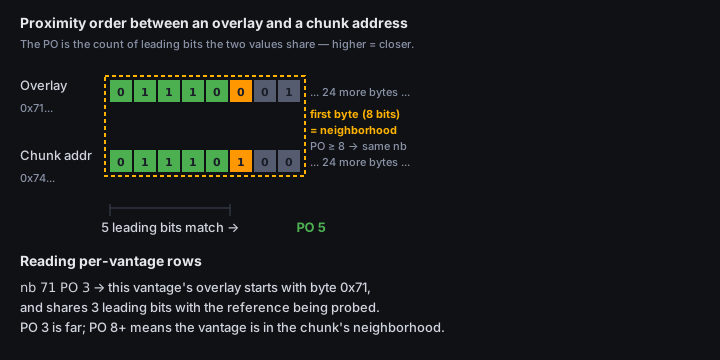
Given two 32-byte values A and B, the proximity order is the number of leading bits they share. Higher = closer.
| PO | Leading bits matching |
|---|---|
| 0 | none — they differ at the very first bit |
| 4 | first 4 bits (i.e. first hex nibble) match |
| 8 | first byte matches — same neighborhood |
| 16 | first two bytes match |
| 32 | first 4 bytes match — very close |
| 256 | identical |
In Swarm, chunks with address X are pushed toward (and stored by)
peers with high proximity to X. So a vantage with PO 8+ to the
reference is in the chunk’s neighborhood; a vantage with PO 0 or
PO 1 is on the other side of the network and is sampling
retrieval through the network, not local storage.
Reading the per-vantage row
nb 71 PO 3
means: this node’s overlay starts with byte 0x71 (neighborhood
71), and its overlay shares 3 leading bits with the reference
being probed. PO 3 is far — the node is not in the chunk’s
neighborhood, so a “yes” here genuinely means the network retrieved
the content for this node from elsewhere.
Per-chunk proximity
With --per-chunk, each chunk also reports per-vantage proximity to
that specific chunk’s address. So a --per-chunk report can say:
chunk
1a2b…(neighborhood1a) was missing onhttp://b.example(overlayc4…, PO 0 to this chunk) but found onhttp://a.example(overlay1a…, PO 8 to this chunk)
That’s diagnostic gold: the chunk is only answerable by a node in its own neighborhood; the rest of the network either doesn’t know about it or can’t route to a storer.
See also
- Swarm docs — Address space and Kademlia (the Book of Swarm chapter on overlay topology)
- Bee API —
GET /addresses
--target-overlay: framing the question
bee-check --target-overlay HEX re-sorts the vantages closest-first
to a hypothetical target overlay and tags each with
target_proximity. Use this when you’re asking “from a node near
neighborhood X, is this retrievable?” — useful when you’re debugging
a specific user’s experience and you know their overlay.
Manifests and per-chunk drill-down
A Swarm reference can point at:
- A raw chunk — up to 4 KiB of arbitrary bytes.
- A manifest — a Mantaray-encoded trie that maps paths to other references. A manifest’s tree can be many chunks deep.
When you GET /bzz/{ref}/, Bee walks the manifest from ref,
descends to the leaf for the requested path, then fetches the
content reference stored there. The user sees one “file” — the
network does many chunk retrievals under the hood.
Why per-chunk matters
A GET /stewardship/{ref} either says yes or no for the whole tree.
That’s useful for a top-level signal but it hides a lot:
- A 50 MB upload is roughly 12,500 chunks. If 50 of them are missing from one neighborhood, stewardship says no with no further detail.
- A manifest with one slow neighborhood will return slow yes and you won’t know which chunks were the bottleneck.
--per-chunk walks the manifest with GET /chunks/{addr} on every
vantage and records:
- which chunks were found,
- how long each fetch took,
- the chunk’s neighborhood (first byte of its address),
- per-vantage proximity to that chunk.
The result is a matrix: rows = chunks, columns = vantages, cells = found/missing + elapsed_ms. Plus two roll-up tables in the report:
- per_vantage — how each vantage performed across all chunks (found ratio, p50/p95/max latency).
- per_neighborhood — how each chunk neighborhood performed across all vantages (reveals “neighborhood 0x4a is slow everywhere” patterns).
How the walk works
Starting from the root reference:
- Fetch the chunk via
GET /chunks/{addr}. - Try to parse it as a Mantaray node.
- If parsing succeeds:
- Record the node’s
target_address(the content reference at this node, if any). - Enqueue every fork’s child manifest chunk.
- Record the node’s
- If parsing fails: it’s a leaf or raw content — stop walking from here.
The walk is breadth-first and capped at 1000 chunks to bound work for pathological trees. If your manifest is larger than that you’ll get a representative sample but not the full picture; in practice 1000 chunks ≈ 4 MB of structure which is more than enough for typical sites and archives.
Chunk addresses are not file paths
A chunk’s address is its content hash, not its path in the manifest.
So a chunk whose address starts with 0x4a is in neighborhood 4a
regardless of where it appears in the directory tree. Patterns
across “slow neighborhoods” rarely correlate with which file the
chunks belong to — that’s expected.
See also
- Swarm docs — Manifests
- Swarm docs — Mantaray (specification)
- Bee API —
GET /chunks/{addr} - Bee API —
GET /bytes/{ref}
Postage batches and re-seeding
Uploads to Swarm are paid for with postage batches — pre-funded allowances of chunk-storage capacity bought on-chain. Every chunk stored in the network carries a stamp linking it to a batch; if the batch expires, the chunks become unstamped and storer nodes eventually drop them.
This matters for retrievability because:
- a reference that was fine yesterday can become unretrievable if the batch it was uploaded with expired and storers garbage- collected the chunks;
- re-uploading the same content (re-seeding) refreshes the stamp but does not automatically use the original batch — you supply a current batch.
What bee-check --reseed does
bee-check <ref> --reseed --stamp <batch-id> --bee https://my-bee.example
Two API calls, in order:
-
GET /stamps/{batch-id}on the target Bee — pre-flight check. Verifies that the batch:- is known to this Bee (
exists) - is
usable(chain has confirmed enough blocks) - has a TTL ≥ 24h (warns otherwise — re-seeding from a batch that’s about to expire would be wasted effort)
- is known to this Bee (
-
PUT /stewardship/{ref}with theswarm-postage-batch-idheader — instructs Bee to re-upload all chunks reachable fromref, stamped with this batch. Bee fetches anything it doesn’t have locally, hashes everything, and pushes it back into the network with fresh stamps.
The pre-flight step is what makes --reseed safe to wire into a
script: it refuses to fire the re-upload if the batch is unhealthy,
so you don’t burn API time on a doomed operation.
What you need before you can re-seed
- A postage batch you control on the target Bee, currently usable, with enough TTL left to be worth using.
- The reference you want to re-seed — and the chunks must be reachable from somewhere in the network or locally pinned. Bee re-fetches chunks during reupload; if no peer has them and the local store doesn’t either, the chunks can’t be re-stamped and the upload will be incomplete.
When to re-seed
- Approaching batch expiration of an important upload.
- After a stewardship
partialorunretrievableand you suspect garbage collection. - After moving content between Bee nodes (“transferred” content needs to be re-stamped from the new node’s perspective).
When not to re-seed: if stewardship says false because the
content was never pushed (deferred upload, network split). Re-
seeding requires retrievability of the source chunks — see the
lost-upload cookbook entry for that
case.
See also
Installation
From crates.io (recommended)
cargo install bee-check
Requires a recent Rust toolchain (1.76+). The binary lands in
~/.cargo/bin/bee-check.
Prebuilt binaries
Releases include prebuilt binaries for:
- Linux x86_64, aarch64
- macOS x86_64, aarch64
- Windows x86_64
Grab them from
github.com/ethswarm-tools/bee-check/releases,
or use the installer scripts shown on each release page.
From source
git clone https://github.com/ethswarm-tools/bee-check
cd bee-check
cargo build --release
./target/release/bee-check --help
Verifying the install
bee-check --version
bee-check --help
Default Bee URL
If you don’t pass --bee, bee-check uses $BEE_API_URL (if set)
or falls back to http://localhost:1633. Setting BEE_API_URL once
in your shell rc file is the easiest way to skip typing --bee http://... every time.
Command reference
bee-check <INPUT> [OPTIONS]
Positional
| Argument | Description |
|---|---|
<INPUT> | Swarm reference (64- or 128-hex) or feed handle feed:OWNER:TOPIC (40-hex owner, 64-hex topic). Feed inputs are resolved via GET /feeds/{owner}/{topic} on the first --bee. |
Probing
| Flag | Default | Description |
|---|---|---|
-b, --bee <URL> | $BEE_API_URL or http://localhost:1633 | Bee API URL. Repeat for multi-vantage. |
--gateway <URL> | https://api.gateway.ethswarm.org (unless --no-gateway) | Public gateway to HEAD-probe via {url}/bzz/{ref}/. Repeat for multiple. |
--no-gateway | — | Skip public-gateway probing entirely. |
--target-overlay <HEX> | — | Sort vantages closest-first to this target overlay and tag each with target_proximity. |
--per-chunk | off | Walk the manifest and probe every reachable chunk on every vantage. Capped at 1000 chunks. |
--cold | off | End-to-end download probe. Streams GET /bytes/{ref} from each Bee URL and GET /bzz/{ref}/ from each gateway, recording total bytes + elapsed_ms. Complements stewardship. |
--timeout <SECS> | 60 | Per-call timeout. |
--concurrency <N> | 8 | Max parallel chunk probes during --per-chunk. |
Re-seed
| Flag | Description |
|---|---|
--reseed | After probing, re-upload the reference via PUT /stewardship/{ref}. Requires --stamp. |
--stamp <ID> | Postage batch ID for re-seed (64-hex). |
See The re-seed flow for the full sequence.
Output
| Flag | Default | Description |
|---|---|---|
--output <FORMAT> | text | One of text, json. See Output formats. |
-v, --verbose | off | Repeat for more: -v info, -vv debug (incl. every HTTP call), -vvv trace. Default level is warn. RUST_LOG overrides if set. |
Help and version
bee-check --help
bee-check --version
Worked examples
Single vantage against the default Bee:
bee-check c79394a6c311f816373ec9945365325e7fc0784cfa9a62deec1524d2c2bdc36a
Three vantages + a gateway, JSON output:
bee-check <ref> \
  --bee https://a.example \
  --bee https://b.example \
  --bee https://c.example \
  --gateway https://api.gateway.ethswarm.org \
  --output json
Resolve a feed first, then probe the current update:
bee-check feed:1234567890abcdef1234567890abcdef12345678:5678abcd...
Per-chunk drill-down across two vantages, machine-readable:
bee-check <ref> \
  --bee http://localhost:1633 \
  --bee https://b.example \
  --per-chunk \
  --output json | jq '.chunk_stats'
Pre-flight + re-seed in one command:
bee-check <ref> --reseed --stamp <batch-id> --bee https://my-bee.example
Stewardship + cold-download in one shot — useful when stewardship
disagrees with /bzz and you want to confirm bytes actually flow:
bee-check <ref> --cold --bee http://localhost:1633 \
  --gateway https://api.gateway.ethswarm.org \
  --output json | jq '.cold_downloads'
Output formats
bee-check emits results in one of two formats, selected with
--output.
--output text (default)
Human-readable, terminal-friendly. Roughly:
ref     c79394a6c311f816373ec9945365325e7fc0784cfa9a62deec1524d2c2bdc36a
status  Retrievable

vantages:
  http://localhost:1633     retrievable   312 ms  nb 71 PO 3
  https://b.example          retrievable   1102 ms nb 4a PO 0

gateways:
  https://api.gateway.ethswarm.org  retrievable   480 ms  HTTP 200
If --per-chunk was used, additional tables follow for chunk stats
per vantage, per neighborhood, and (verbose mode) the full chunk
matrix.
This format is for eyes, not scripts. It’s not stable across versions — the JSON format is.
--output json
Machine-readable, stable shape. Emits the full report as a JSON
object matching spec_version: 1:
{
  "reference": "c79394a6c311f816373ec9945365325e7fc0784cfa9a62deec1524d2c2bdc36a",
  "status": "retrievable",
  "vantages": [
    {
      "bee_url": "http://localhost:1633",
      "retrievable": true,
      "elapsed_ms": 312,
      "overlay": "7179...6c9a",
      "bee_version": "2.7.2-rc1-868c1d52",
      "proximity_to_root": 3
    }
  ],
  "spec_version": 1
}
Canonical scripting pattern:
bee-check <ref> --output json | jq '.status'
bee-check <ref> --output json | jq '.vantages[] | select(.retrievable == false)'
bee-check <ref> --per-chunk --output json | jq '.chunk_stats.per_neighborhood'
The JSON output is also what bee-check-web consumes via drag-and-
drop, so you can share a report file with a teammate who’ll then
visualize it in the browser without re-running the probe.
Stability guarantees
- New fields may appear in any release without bumping
spec_version. Consumers must ignore unknown fields. - Renamed or removed fields bump
spec_version. - The text format has no stability guarantee — don’t grep it for
scripting. Use
--output json.
The re-seed flow
Background reading: Postage batches and re-seeding.
TL;DR
bee-check <ref> --reseed --stamp <batch-id> --bee https://my-bee.example
--reseed requires --stamp. --reseed runs against the first
--bee URL — no multi-vantage re-seeding (it would be wasted API
calls; re-seeding is a write, not a probe).
What happens, step by step
- Multi-vantage probe runs first. You see the same vantages
table you’d see without
--reseed. - Pre-flight stamp check via
GET /stamps/{batch-id}on the target Bee.- Refuses to proceed if the batch:
- isn’t known to this Bee (
exists: false) - isn’t usable yet (
usable: false— chain still confirming)
- isn’t known to this Bee (
- Warns (but proceeds) if TTL is below 24h.
- Refuses to proceed if the batch:
- Re-upload via
PUT /stewardship/{ref}with headerswarm-postage-batch-id: <batch-id>.
If step 2 refuses, exit code is non-zero and the re-upload is skipped.
Reading the output
A successful re-seed prints, after the probe table:
re-seed:
  batch     a1b2c3...d4e5
  status    OK
  warnings  (none)
A refused re-seed:
re-seed:
  batch     a1b2c3...d4e5
  status    refused
  warnings:
    - batch not usable yet (chain may be syncing)
Practical notes
- Have the batch ready before you run.
--stampdoesn’t buy a batch; it uses an existing one. Useswarm-cli stamp buyor your Bee’s/stampsendpoint to provision one. - Re-seeding doesn’t relocate content. Bee re-fetches chunks during the upload; if no peer has them and your local store doesn’t either, the operation will leave gaps.
- Don’t re-seed deferred uploads that haven’t pushed yet. First
push them (
POST /chunkscycle) — re-seed is for refreshing stamps on already-network-resident content. - Idempotent on the input side. Running
--reseedagainst the same ref + batch twice doesn’t double-charge the batch; Bee recognizes already-stamped chunks.
Setup and CORS
bee-check-web is a static SPA hosted at
ethswarm-tools.github.io/bee-check-web.
It probes Bee nodes directly from your browser — there is no
hosted backend. That keeps the operational surface tiny but means
your Bee node has to be reachable from the browser, which raises two
real-world snags:
- CORS — your Bee must explicitly allow the SPA’s origin.
- HTTPS / mixed-content — a page served over HTTPS can’t call
plain
http://...URLs (with one exception:http://localhost).
This chapter covers both.
CORS
Set this in your Bee config (typically ~/.bee/bee.yaml):
cors-allowed-origins:
  - https://ethswarm-tools.github.io
  # For local dev with `npm run dev`:
  - http://localhost:5173
Then restart Bee. Verify with:
curl -i -X OPTIONS \
     -H "Origin: https://ethswarm-tools.github.io" \
     -H "Access-Control-Request-Method: GET" \
     http://your-bee:1633/addresses
You should see an Access-Control-Allow-Origin: https://ethswarm-tools.github.io
header in the response.
If you don’t add CORS, the SPA’s probe will return error for that
vantage and the browser console will show a CORS rejection.
HTTPS / mixed-content
The deployed SPA is served over HTTPS. Modern browsers refuse to let
an HTTPS page call http://1.2.3.4:1633 — that’s mixed-content
blocking, and there’s no override flag in normal browser settings.
Your options:
- Point the SPA at
http://localhost:1633—localhostis exempt from the mixed-content rule. - Front your Bee with a TLS reverse proxy (Caddy, nginx, Cloudflare Tunnel, etc.) and point at the HTTPS URL.
- Run the SPA locally (
npm run dev→http://localhost:5173) if you want everything on HTTP.
A mixed-content rejection shows up the same way as a CORS one: the
vantage returns error, and the console explains.
Verifying both work
The easiest sanity check is to load the SPA, paste your Bee URL,
leave the reference field empty, and click anywhere. If the form
accepts your Bee URL and you can see a 200 in the browser network
tab for GET /addresses, you’re set.
Walkthrough
A short tour of the SPA’s surface.
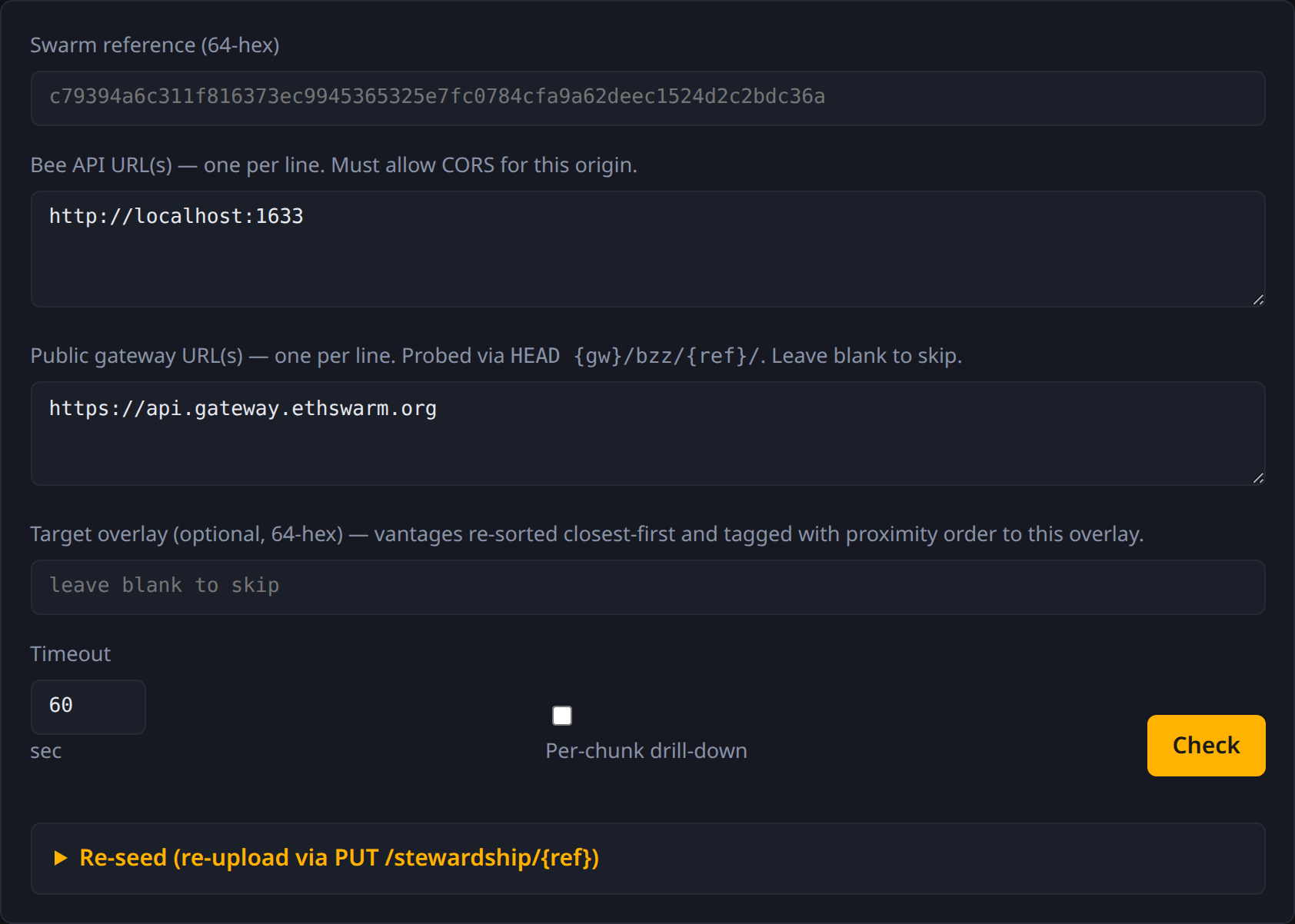
The form
- Swarm reference — 64-hex address, or
feed:OWNER:TOPICfor a feed. - Bee API URL(s) — one per line. Each becomes a vantage.
- Public gateway URL(s) — one per line. Each becomes a gateway probe. Leave blank to skip.
- Target overlay — optional 64-hex. When set, vantages re-sort
closest-first and gain a
target_proximitybadge. - Timeout — per-request cap in seconds.
- Per-chunk drill-down — checkbox. When on, after the basic probe the page walks the manifest and probes every chunk.
- Cold download — checkbox. When on, the page also streams
GET /bytes/{ref}from each Bee URL andGET /bzz/{ref}/from each gateway, recording total bytes and elapsed time. - Check button — runs the probe. While drilling, the button
shows live progress (
Probing chunks N/M…).
The report

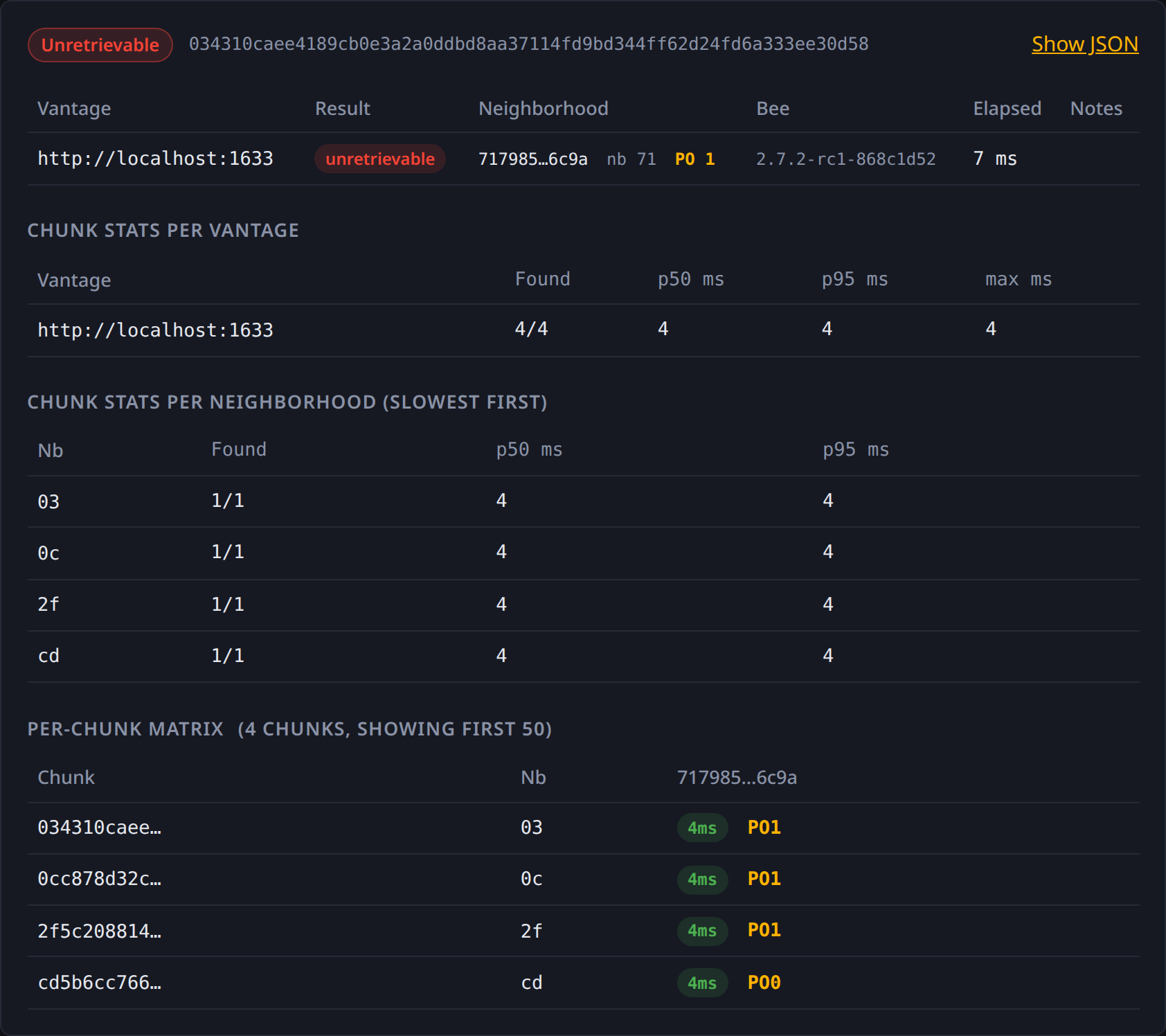
Renders top-to-bottom:
- Status pill + reference at the top.
- Vantages table — one row per Bee URL with: result pill, neighborhood/overlay + PO, Bee version, elapsed_ms, notes.
- Gateways table — if any gateway URLs were given.
- Chunk stats per vantage — if
--per-chunkwas enabled. Rows: vantage → found/total + p50/p95/max latency. - Chunk stats per neighborhood (slowest first) — same shape, keyed on chunk neighborhood. Top-10.
- Per-chunk matrix — first 50 chunks × all vantages, with per-cell elapsed_ms + PO badges (× pill on miss).
- Resolution — present when input was a feed handle.
- Show JSON — toggle to expand the full report as raw JSON for copy/paste.
A --per-chunk run rendered:
The re-seed panel
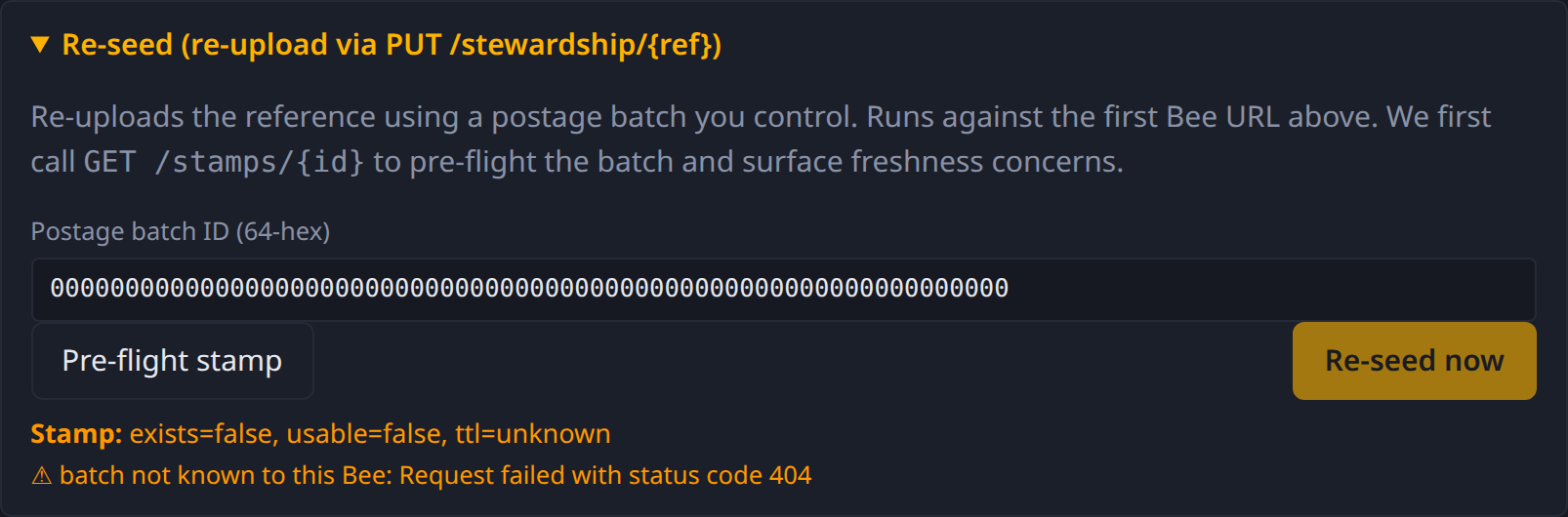
Collapsed by default. Expand it to reveal:
- Postage batch ID — 64-hex.
- Pre-flight stamp button — calls
GET /stamps/{id}, reportsexists / usable / TTLand any warnings. - Re-seed now button — only enabled after pre-flight reports
healthy. Fires
PUT /stewardship/{ref}against the first Bee URL.
Drag-and-drop a report
Drop any bee-check --output json file anywhere on the page (or
any report file the SPA itself produced) and it’ll render in place
of running a fresh probe. Useful for sharing diagnostics: a teammate
runs the CLI, attaches the JSON in a message, you drop it on the
page.
Sharing reports
Two ways to share a diagnostic with a teammate.
Shareable URL
The SPA round-trips its form state through the query string:
https://ethswarm-tools.github.io/bee-check-web/?ref=c79394...&bee=http://localhost:1633&bee=https://b.example
After every probe the URL updates in place (no full reload). Copy the address bar, paste it into Discord/Slack/an issue — the recipient lands on the same form pre-filled and just hits Check.
Note: the URL captures the inputs, not the result. The recipient sees what their own probes return, which may differ from yours (different vantages, different times).
JSON file
If you want to share the result, not just the inputs:
- Run the probe (CLI or SPA).
- CLI:
bee-check ... --output json > report.json. SPA: click Show JSON, copy into a file. - Send the file.
- Recipient drags it onto
ethswarm-tools.github.io/bee-check-web— the page renders the report without re-running any probe.
This is the canonical way to share a frozen-in-time diagnostic. The
JSON shape is stable across spec_version: 1, so reports stay
visualizable across SPA versions.
Cookbook
Worked scenarios — read the chapter whose situation matches yours.
| Situation | Chapter |
|---|---|
Just uploaded; stewardship says no but /bzz works locally | “My upload looks lost” |
| Need to confirm a feed reference is currently retrievable | “Verify a feed reference” |
| Old upload, batch is expiring soon | “Re-seed from an old batch” |
| Suspect a geographic / regional retrievability problem | “Probe across multiple regions” |
Each chapter is structured the same way: symptom, diagnose, fix.
“My upload looks lost”
Symptom
You just uploaded content and got a reference back. The reference works locally:
curl -I http://localhost:1633/bzz/<ref>/ # 200 OK
…but stewardship says it isn’t retrievable:
bee-check <ref> --bee http://localhost:1633
# status  Unretrievable
Diagnose
The most common cause is a deferred upload that hasn’t been pushed
to the network yet. Bee’s default is to accept the upload, return
the reference immediately, and push chunks in the background. The
/bzz endpoint serves from the local store; the /stewardship
endpoint deliberately goes through the network retrieval path —
which means it can’t see chunks that haven’t yet propagated.
Confirm with --per-chunk from a different vantage. If most or
all chunks miss everywhere except your uploading node, you’re
looking at a not-yet-pushed upload.
Fix
Option A: wait. Background push completes on its own. Re-run
bee-check after a few minutes.
Option B: force an immediate push. Re-upload synchronously by
sending swarm-deferred-upload: false on the original upload —
Bee will only acknowledge after every chunk is pushed and stamped.
Option C: re-seed with a current batch. If the original batch is fine but you want chunks pushed now:
bee-check <ref> --reseed --stamp <current-batch-id> --bee http://localhost:1633
This re-fires the stamp and re-pushes anything the network is missing.
Note: If your local store has been garbage-collected and there’s no peer with the chunks, none of these work — the upload is genuinely lost. That’s why deferred-upload reliability matters: you only get one chance to push.
“Verify a feed reference”
Symptom
You publish updates through a Swarm feed (an (owner, topic) pair).
A consumer reports they can’t read the latest update; you want to
confirm whether the current feed payload is retrievable from the
network.
Diagnose
Pass the feed handle directly — bee-check resolves it first, then
probes the resolved chunk reference:
bee-check feed:<40-hex-owner>:<64-hex-topic> \
  --bee https://my-bee.example \
  --bee https://b.example
The output includes a resolution block recording the original
handle and the resolved reference:
resolved feed:
  owner   1234...abcd
  topic   5678...beef
  ref     c79394...bdc36a

status  Partial
Two failure modes look different:
- Feed lookup itself failed — error mentions
feedsendpoint and you get no resolution. Probably means the feed has no published updates on this Bee’s view, or the owner/topic is wrong. Re-run against a different--beeto rule out a single-node visibility issue. - Feed resolved fine but the payload is unretrievable — same
as any other reference-unretrievable case. Continue with
--per-chunkto see which chunks are missing where.
Fix
If the resolved reference is the lost-upload case, see the lost- upload chapter.
If the feed itself didn’t resolve, check that your last update was
actually published — swarm-cli feed update returning success isn’t
quite the same as the soc chunk being retrievable network-wide. Wait
a few seconds and re-probe; feeds are stored like any other chunk
and propagate through the same neighborhood.
“Re-seed from an old batch”
Symptom
You have content uploaded a while back. The original postage batch is approaching expiration — once it expires, storer nodes will start to garbage-collect the chunks. You want to extend the content’s life with a fresh batch.
Diagnose
First, confirm the content is still retrievable now — re-seeding requires the source chunks to be fetchable:
bee-check <ref> --bee https://my-bee.example --per-chunk
If status is retrievable (or partial with most chunks found),
proceed. If everything is missing, re-seeding won’t help — you’d be
re-uploading nothing.
Then buy a fresh batch (out of scope for bee-check):
# example via swarm-cli; adjust to your setup
swarm-cli stamp buy --depth 22 --amount 10000000 --label "renewal"
Note the new batch ID.
Fix
bee-check <ref> --reseed --stamp <new-batch-id> --bee https://my-bee.example
bee-check will:
- Re-probe the reference (so you have a before-snapshot of which chunks needed fetching).
- Pre-flight the new batch — refuses to proceed if it isn’t usable or has too little TTL.
- Fire
PUT /stewardship/{ref}— Bee re-fetches each chunk (locally or from the network), stamps it with the new batch, and pushes the freshly-stamped chunk back into the network.
Re-run bee-check after a few minutes to verify the content is
retrievable on the new stamp. The old batch can now expire safely.
Cost note. Re-seeding consumes batch capacity. Make sure the new batch has enough depth/amount to cover the content. Bee will error mid-upload if the batch fills up.
“Probe across multiple regions”
Symptom
Users in different regions report different retrievability. You want to confirm whether the issue is geographic (network-side) or isolated to specific clients.
Diagnose
Multi-vantage is the whole point. Run with --bee pointing at nodes
in different regions:
bee-check <ref> \
  --bee https://us-east.bee.example \
  --bee https://eu-central.bee.example \
  --bee https://ap-south.bee.example \
  --gateway https://api.gateway.ethswarm.org \
  --output json | jq '.vantages | map({bee_url, retrievable, elapsed_ms, proximity_to_root})'
What to look for in the output:
- Same status across all vantages. Probably a content-level issue (lost, garbage-collected, never pushed) — region isn’t the axis.
partialwith a regional pattern. US says yes, EU says no. Drop into--per-chunkfrom the failing region — likely a neighborhood-level retrieval problem rooted in that region’s peering.- All slow but eventually yes. Long latencies (multi-second)
with the same status — likely overloaded chunks of the manifest;
cross-reference with
chunk_stats.per_neighborhood.
Useful: target-overlay framing
If you have a specific user’s overlay (or you know their gateway’s
overlay), pass it as --target-overlay. The report sorts vantages
closest-first to that overlay and tags each with target_proximity:
bee-check <ref> --target-overlay <user-overlay-hex> --bee ... --bee ...
The closest vantage to that overlay is your best proxy for “what
the user actually sees”. A retrievable from a near vantage but
unretrievable from a far one is a strong signal that the user’s
network position is the problem, not the content.
Fix
Diagnosis-only — fixes depend on what you find. Common follow-ons:
- Stale stamps → Re-seed from an old batch.
- Not-yet-pushed → My upload looks lost.
- Specific neighborhood unreachable → escalate to whoever runs Bee nodes in that neighborhood (or run one yourself).
Report JSON shape (spec_version 1)
This page summarizes the spec_version: 1 report shape that both
bee-check --output json and bee-check-web produce. The
authoritative version lives in
SPEC.md
in the repo — this chapter mirrors it for ease of reading.
Top level
{
  "reference":    "c79394...bdc36a",
  "status":       "retrievable" | "unretrievable" | "partial" | "error",
  "vantages":     [ VantageResult, ... ],
  "gateways":     [ GatewayResult, ... ],    // omitted when no --gateway
  "resolution":   Resolution,                // present when feed input
  "chunks":       [ ChunkProbe, ... ],       // present when --per-chunk
  "chunk_stats":  ChunkStats,                // present when --per-chunk
  "spec_version": 1
}
Aggregate status
| status | meaning |
|---|---|
retrievable | every vantage and gateway returned yes |
unretrievable | every vantage returned no or errored |
partial | at least one yes and at least one not-yes |
error | every vantage errored without producing an answer |
Exit code is 0 iff at least one yes; 2 otherwise.
VantageResult
{
  "bee_url":           "http://localhost:1633",
  "retrievable":       true | false | null,    // null when the call errored
  "elapsed_ms":        312,
  "error":             "...",                  // present when retrievable is null
  "overlay":           "7179...6c9a",
  "bee_version":       "2.7.2-rc1-868c1d52",
  "proximity_to_root": 3,
  "target_proximity":  5                       // present with --target-overlay
}
GatewayResult
{
  "url":         "https://api.gateway.ethswarm.org",
  "retrievable": true | false | null,
  "elapsed_ms":  412,
  "status_code": 200,        // omitted on network error
  "error":       null
}
Resolution
Present when the user supplied feed:OWNER:TOPIC:
{
  "kind":               "feed",
  "owner":              "1234...abcd",
  "topic":              "5678...beef",
  "resolved_reference": "c79394...bdc36a"
}
ChunkProbe
{
  "address":      "1a2b3c...ef",
  "neighborhood": "1a",
  "per_vantage": {
    "http://localhost:1633": {
      "found":      true,
      "elapsed_ms": 412,
      "proximity":  4
    }
  }
}
ColdDownloadResult
Present when --cold was used. One entry per --bee (probed via
/bytes/{ref}) and one per --gateway (probed via /bzz/{ref}/).
{
  "url":              "http://localhost:1633",
  "endpoint":         "/bytes/{ref}",
  "success":          true,
  "bytes_downloaded": 4096,
  "elapsed_ms":       312,
  "status_code":      200,
  "error":            null
}
Informational only — cold_downloads does NOT contribute to the
top-level status aggregate. Surfaces end-to-end transport
behavior independent of stewardship.
ChunkStats
{
  "per_vantage": {
    "http://localhost:1633": {
      "total": 42, "found": 40, "missing": 2,
      "elapsed_p50_ms": 120, "elapsed_p95_ms": 540, "elapsed_max_ms": 800
    }
  },
  "per_neighborhood": {
    "1a": {
      "total": 10, "found": 10, "missing": 0,
      "elapsed_p50_ms": 200, "elapsed_p95_ms": 1100, "elapsed_max_ms": 1400
    }
  }
}
Compatibility rules
- New fields may be added in any release without bumping
spec_version. Consumers must ignore unknown fields. - Renames or removals bump
spec_version. - The two surfaces (
bee-checkandbee-check-web) ship the same spec version at any given time.
Exit codes
| Code | Meaning |
|---|---|
0 | At least one vantage (or gateway) returned retrievable: true. Includes retrievable and partial statuses. |
2 | No vantage returned retrievable: true. Includes unretrievable (every vantage said no or errored) and error (every vantage errored). |
| other | Unexpected error: arg parsing failed, invalid reference, internal panic, etc. |
The shape is intentionally coarse: 0 = “someone in your fleet
can get it”, 2 = “no one can”. For finer-grained CI logic, pipe
--output json through jq instead of relying on exit codes.
CI integration patterns
Fail a CI job if a reference becomes unretrievable from any of three vantages:
bee-check <ref> --bee a.example --bee b.example --bee c.example --output json | \
  jq -e '.vantages | all(.retrievable == true)'
Alert on partial status (any retrievability degradation):
bee-check <ref> --bee a.example --bee b.example --output json | \
  jq -e '.status == "retrievable"'
Track p95 over time:
bee-check <ref> --per-chunk --output json | \
  jq '.chunk_stats.per_vantage[].elapsed_p95_ms'
Comparison to check.ipfs.network
bee-check is the Swarm analog of
check.ipfs.network — IPFS’s
retrievability checker. They solve the same problem on different
protocols.
Feature-by-feature
| Capability | check.ipfs.network | bee-check (CLI) | bee-check-web (SPA) |
|---|---|---|---|
| Single retrievability probe | ✅ | ✅ GET /stewardship/{ref} | ✅ |
| Mutable-name resolution | ✅ IPNS / DNSLink | ✅ feed:OWNER:TOPIC | ✅ |
| Multi-vantage / multi-peer | ⚠️ one Multiaddr field | ✅ --bee repeats | ✅ one URL per line |
| Gateway probe | ⚠️ optional HTTP retrieval | ✅ --gateway repeats | ✅ one URL per line |
| Per-block / per-chunk drill-down | ❌ | ✅ --per-chunk | ✅ checkbox |
| Per-vantage latency | ❌ | ✅ elapsed_ms + p50/p95/max | ✅ same stats |
| Neighborhood / proximity context | partial (DHT advert check) | ✅ overlay + PO + --target-overlay | ✅ |
| Node identity in report | ❌ | ✅ overlay + version | ✅ |
| Per-chunk matrix view | ❌ | ✅ JSON | ✅ table |
| JSON export / shareable report | ❌ | ✅ --output json | ✅ Show JSON + drop-to-render |
| Shareable diagnostic link | ❌ | ❌ | ✅ ?ref=…&bee=… |
| Active repair (re-seed / re-pin) | ❌ | ✅ --reseed | ✅ panel with pre-flight gate |
| Stamp pre-flight before repair | n/a | ✅ check_stamp | ✅ |
| Progress feedback during long probes | ❌ | implicit | ✅ “Probing N/M…” |
| Direct libp2p Multiaddr dial | ✅ | ❌ HTTP-only | ❌ |
| DHT advertisement record check | ✅ | ❌ uses stewardship as proxy | ❌ |
| ENS / DNSLink-equivalent | ✅ | ❌ feeds only | ❌ feeds only |
Where they differ in mechanism
- DHT vs stewardship.
check.ipfs.networkasks “is this CID advertised in the DHT, and can the storing peer be reached?” — it inspects the routing layer directly.bee-checkdoesn’t have a Swarm-DHT analog to inspect; instead it asks a Bee node “can you retrieve this through the network?” which is a higher-level signal but covers the same ground (a chunk that isn’t reachable also wouldn’t satisfy a stewardship retrieve). - HTTP vs libp2p. Everything
bee-checkdoes goes through Bee’s HTTP API. There is no direct peer-to-peer dial. The cost is one layer of indirection; the benefit is no libp2p stack in your toolchain and no need to operate a peer.
What’s still in IPFS-check’s column
Three things check.ipfs.network does that bee-check doesn’t:
- Direct libp2p Multiaddr dial. Asks “can I, the checker, talk to this specific peer right now?” Swarm equivalent would be a Bee-to-Bee health check that doesn’t exist as a public API.
- Inspect the DHT routing record directly. Swarm doesn’t expose its routing layer the way libp2p Kademlia does.
- ENS / DNSLink-style naming. Both could be added to
bee-check(ENS would need a JSON-RPC client + namehash + the ENS resolver contract); it just isn’t there yet.
If any of these matter for your workflow, file an issue.
Glossary
Short definitions of Swarm-specific terms used throughout this book. Each entry links to the chapter where the concept is developed in full.
BMT (Binary Merkle Tree)
The hash construction Swarm uses to address chunks. Operates on 4 KiB blocks with keccak256 as the underlying hash. Produces a 32-byte address per chunk. The structural alternative to a flat sha-256 hash.
Batch (postage batch)
A pre-funded allowance of chunk-storage capacity bought on-chain. Identified by a 32-byte ID. Every chunk uploaded to Swarm needs to be stamped with a batch; when the batch expires, storer nodes eventually drop the chunks. See Postage batches and re-seeding.
Chunk
The unit of storage in Swarm — up to 4 KiB of bytes, addressed by its BMT hash. Everything in Swarm (files, manifests, feed updates) is ultimately a graph of chunks.
Deferred upload
Bee’s default upload mode: the API accepts your data, returns the reference immediately, and pushes the chunks into the network in the background. Fast but means there’s a window where the reference exists locally and isn’t yet retrievable network-wide. See “My upload looks lost”.
Feed
Swarm’s mutable-name primitive — the analog of IPNS / DNSLink.
Identified by an (owner, topic) pair where owner is a 20-byte
Ethereum address and topic is a 32-byte hash. Resolved via
GET /feeds/{owner}/{topic}. See
Swarm references vs IPFS CIDs.
Gateway (public gateway)
A public Bee node exposed over HTTPS that serves GET /bzz/{ref}/
without auth. bee-check --gateway <URL> HEAD-probes one as an
external retrievability vantage. Default is
https://api.gateway.ethswarm.org.
Manifest
A Mantaray-encoded trie stored as a graph of chunks. Maps paths
(like file paths) to chunk references. What GET /bzz/{ref}/path
walks. See
Manifests and per-chunk drill-down.
Mantaray
The serialization format used for manifests. Each node fits in one
chunk and has up to 256 forks (one per first-byte of a child path).
Nodes can also carry a target_address pointing at content chunks.
Neighborhood
The first byte of an overlay or chunk address, by convention used
to describe “where in the address space” something lives. A chunk
in neighborhood 0x4a is one whose address starts 0x4a…; storer
nodes with overlays starting 0x4a… are the chunk’s primary
neighbors. See Proximity.
Overlay (overlay address)
A node’s 32-byte identifier in the same address space as chunk
references. Determines which chunks the node is responsible for.
GET /addresses returns it. bee-check surfaces each vantage’s
overlay so you can read its neighborhood.
PO (proximity order)
The number of leading bits two 32-byte values share. PO 0 = no shared bits; PO 8 = same first byte (same neighborhood); PO 256 = identical. The closeness metric in Swarm’s address space. See Proximity.
Reference
A 32-byte (64-hex) or 64-byte (128-hex, encrypted) Swarm address.
Can point at a raw chunk, a manifest root, or a feed update. The
input bee-check takes.
Re-seed
Re-uploading a reference’s chunks under a fresh postage batch,
typically to refresh stamps before a batch expires. bee-check --reseed --stamp <id> does the pre-flight + PUT /stewardship/{ref}
flow. See Postage and re-seeding.
SOC (single-owner chunk)
A chunk whose address is (owner_address, topic)-derived rather
than content-derived. The substrate underneath feeds — each feed
update is a SOC. Not directly addressed by bee-check today.
Stamp
The cryptographic proof that a chunk’s storage is paid for by a specific postage batch. Storer nodes only keep chunks with valid stamps; expired-batch chunks are eventually garbage-collected.
Stewardship probe
The GET /stewardship/{ref} endpoint a Bee node exposes. Walks
the manifest at ref and tries to fetch every chunk through the
network retrieval path, returning { "isRetrievable": true|false }.
Different from /bzz which serves from local store when possible.
See The stewardship probe.
Vantage
In bee-check, one --bee URL — a single perspective on
retrievability. Multi-vantage probing samples retrievability from
multiple points in the network. See
Multi-vantage.
Troubleshooting
Common failure modes and how to read them.
“every vantage returns error”
Top-level status is error, every row shows error instead of
retrievable/unretrievable.
Likely cause: none of the API calls completed.
- Wrong Bee URL? Confirm the URL responds:
curl http://your-bee:1633/healthshould return JSON. - Network unreachable? Firewall, VPN, DNS.
- Bee API auth. Some deployments gate the API;
bee-checkdoesn’t currently send auth headers. Run against a node you can hit anonymously.
“vantage error: CORS rejection” (web only)
The browser blocked the cross-origin request. The Bee at that URL
needs cors-allowed-origins to include the page’s origin. See
Setup and CORS.
“vantage error: blocked: mixed-content” (web only)
The SPA is on HTTPS, your Bee URL is http://... and not on
localhost. Either point at http://localhost:1633, or serve your
Bee over HTTPS via a reverse proxy.
“stewardship says no but /bzz works”
Expected: stewardship walks the network retrieval path; /bzz
serves from local. See the stewardship chapter
and My upload looks lost.
“every chunk has very high latency”
The probe completes but chunk_stats shows multi-second p95.
Possibilities:
- The probing node is far from the chunks’ neighborhood — every
fetch is traversing many hops. Check
proximity_to_rootand per-chunkproximity. - The Bee is under load or has a slow disk.
- The network neighborhood is degraded (run from another vantage to isolate).
“--reseed refused: batch not usable yet”
The chain hasn’t confirmed enough blocks. Wait a few minutes after buying the batch and retry. On Sepolia, batches can take several minutes to become usable on first buy.
“every chunk found locally but stewardship says no”
The node has the chunks pinned (so /chunks/{addr} returns them
from local store) but the network retrieval that stewardship uses
takes a different path — and that path can’t find peers with the
chunks. Same root cause as “my upload looks lost”: chunks haven’t
propagated. Re-seeding with a current batch typically resolves it.
“feed lookup failed: 404”
The Bee you’re probing has never seen an update for this
(owner, topic) pair. First-time lookups on a feed can take 30-60s
on Sepolia; the Bee caches results, so subsequent calls are fast.
Wait and retry, or use a different vantage that has seen the feed
before.
Getting more output
bee-check <ref> -v        # info: per-stage milestones
bee-check <ref> -vv       # debug: per-vantage results + every HTTP call
bee-check <ref> -vvv      # trace: per-chunk probe events
-vv is usually the sweet spot — it surfaces every underlying
bee-rs HTTP call (method, URL, status, elapsed) which is normally
the fastest way to a root cause. RUST_LOG still overrides the
flag if you want fully custom filtering, e.g.
RUST_LOG=bee_check=info,reqwest=debug bee-check ....
--output json includes every field unconditionally and is far more
informative than the text rendering — useful for scripting and for
sharing diagnostics.
For the web UI, the browser DevTools network tab shows every underlying HTTP call and its response — usually the fastest path to a root cause.
What’s new
Release highlights for both surfaces. The authoritative changelogs are the GitHub release notes — CLI and SPA — this page is a hand-curated narrative view.
CLI (bee-check)
v0.5.0 — cold-content end-to-end probe
- New
--coldflag streamsGET /bytes/{ref}from each--beeandGET /bzz/{ref}/from each--gateway, recording bytes downloaded and full-transfer latency. Complements stewardship by exercising the HTTP body transport, catching cases where the chunk graph walks fine but bytes don’t actually flow. - Spec adds
cold_downloads: ColdDownloadResult[](additive on spec_version 1). - See the stewardship chapter.
v0.4.0 — chunk timing + target-overlay
- New
ChunkStatsroll-up: per-vantage and per-neighborhood found/missing counts + p50/p95/max latency, computed in pure-Rust post-processing over thechunks[]array. - New
--target-overlay HEXflag sorts vantages closest-first to a target overlay and tags each withtarget_proximity. Useful for “from a user near neighborhood X” framings. - Both additive on spec_version 1.
v0.3.0 — gateways + feeds
- New
--gatewayflag (repeatable) HEAD-probes a public Swarm gateway. Default:api.gateway.ethswarm.org(which returns proper 404s, unlike the apexgateway.ethswarm.orgstatic landing page).--no-gatewayopts out. - Positional input now accepts
feed:OWNER:TOPIC(orfeed:OWNER/TOPIC); resolved viaGET /feeds/{owner}/{topic}on the first--bee.resolutionfield records the original handle. - Aggregate
statusnow unions vantages + gateways.
v0.2.0 — perception parity (“which neighborhood?”)
- Per-vantage
overlay(fromGET /addresses) andbee_version(fromGET /health). - Per-vantage
proximity_to_root— PO between probe’s overlay and the reference. - Per-chunk
proximitywhen--per-chunkis used. --reseedgained a stamp pre-flight viaGET /stamps/{id}, surfacing exists/usable/TTL warnings before firing the upload.
v0.1.0 — initial
- Multi-vantage
GET /stewardship/{ref}probe; aggregate status. - Optional
--per-chunkmanifest walk + chunk probes. - Optional
--reseed --stamp <id>re-upload viaPUT /stewardship/{ref}. --output text(human) /--output json(spec_version 1).
Web UI (bee-check-web)
v0.5.0 — CLI parity
- Per-chunk drill-down in the browser — checkbox enables BFS
manifest walk via
MantarayNode.unmarshal, probes every chunk on every vantage. Same per-vantage + per-neighborhood roll-ups as the CLI. Per-chunk matrix table rendered inline. - Re-seed flow — expandable panel with
getPostageBatchpre-flight andreuploadPinnedDataexecution. “Re-seed now” button disabled until pre-flight reports healthy. - Live “Probing chunks N/M…” progress while drilling.
v0.4.0 — chunk-stats tables + target-overlay
- New tables: chunk stats per vantage, per neighborhood (slowest first, top 10).
- Target-overlay input re-sorts vantages closest-first.
v0.3.0 — gateway + feed support
- Gateway URL textarea + per-gateway result row.
feed:OWNER:TOPICresolution before probing.
v0.2.0 — neighborhood / proximity rendering
- Per-vantage row gained overlay (truncated, hover for full), neighborhood badge, PO-to-root badge, Bee version.
v0.1.0 — initial scaffold
- Multi-vantage stewardship probe from the browser.
- Drag-and-drop JSON visualization.
- Shareable URLs (
?ref=…&bee=…) and LocalStorage for Bee URLs.
Contributing
Both projects live under the ethswarm-tools
GitHub org.
- CLI:
ethswarm-tools/bee-check - SPA:
ethswarm-tools/bee-check-web - Book: this directory (
bee-check/book/) — edit links at the bottom of each page take you to the source.
What’s interesting to work on
- ENS resolution — the biggest deferred feature. Needs an Ethereum JSON-RPC client + namehash + a call to the ENS resolver contract. Applies to both CLI and SPA. ~300 LOC + a JSON-RPC dep on the Rust side.
- Cold-content download probe — currently we probe stewardship
and per-chunk; a
/bytes/{ref}end-to-end download would round out the retrievability story for non-manifest content. bzz.link/ Swarm-hosted SPA — dogfood the deployment by mirroringbee-check-webonto Swarm itself.
Report shape changes
The spec_version: 1 JSON shape is defined in
SPEC.md
in the CLI repo. Both surfaces (CLI’s Report Rust struct and the
SPA’s TS types) implement that shape — keep them in sync.
- New fields = additive, no version bump. Consumers must ignore unknown fields.
- Renames or removals bump
spec_version.
Local development
CLI:
cargo run -- <ref> --bee http://localhost:1633
cargo test
SPA:
cd bee-check-web
npm install
npm run dev     # http://localhost:5173/bee-check-web/
npm run check   # svelte-check
npm run build
Book:
cd bee-check/book
mdbook serve --open    # http://localhost:3000
mdbook build           # static output in book/book/
Release process
CLI: tag vX.Y.Z, push — cargo-dist builds and uploads prebuilt
binaries; cargo publish for crates.io.
SPA: bump package.json, commit, push to main — GH Pages workflow
deploys automatically. Tag vX.Y.Z and gh release create for a
named release.
Book: edits to book/** trigger the book deploy workflow on push
to main.